Turn talk into notes.
Meetings, calls, lectures. Just record, and go from transcript to summary. It even tells speakers apart. Your voice never leaves your iPhone.
 Get it on the App Store


Transcription
Speak, and it's text.
Choose Japanese or English and transcribe in real time. Add more languages your iPhone supports, like Korean and Chinese, from Settings. When English slips into the conversation, it recognizes both languages at once (on import and re-generation).
- On-device transcription by Apple's Speech framework
- Japanese or English, plus more languages from Settings
- Words appear as you record
Summary
Decisions and to-dos.
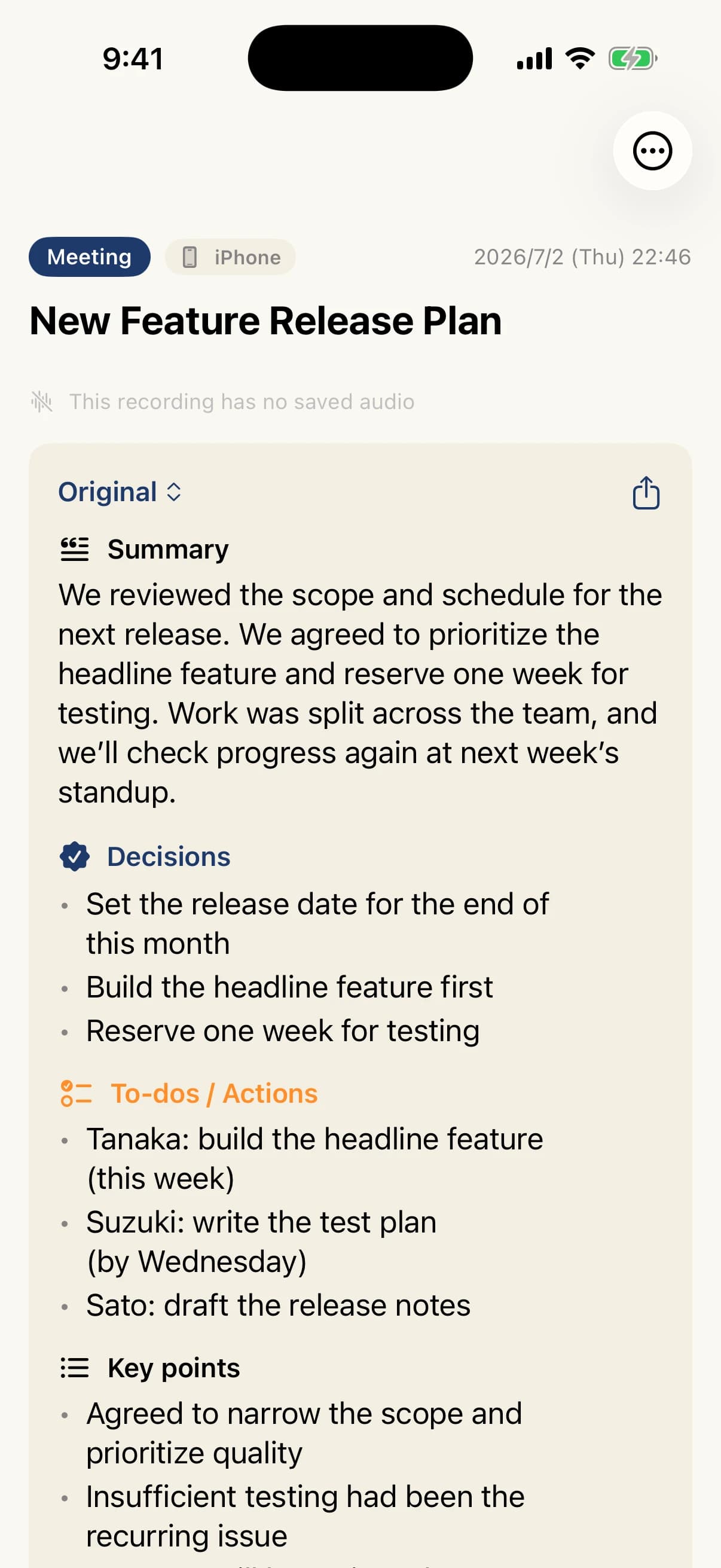
Summarize when you want to. Tap "Summarize with AI" and it reads the scene, sorts everything into decisions, to-dos, and key points, and builds an outline summary with themed headings.
- Summaries by Apple Intelligence (on device / Apple's Private Cloud Compute)
- Sorted into decisions, to-dos, key points
- Titles generated from the summary
Speaker ID
Speakers, by name.
Enroll a voiceprint and speakers show up by name, like "Tanaka." You can also see how long each person spoke.
- On-device speaker separation by FluidAudio
- Names shown once a voiceprint is enrolled
- Talk time per speaker

Documents
Papers, in context.
Attach a meeting's PDF and both term recognition and summary quality improve.
- PDF text extraction stays on-device
- Better recognition of specialized terms
- The document itself is never uploaded

Apple Watch
Start from your wrist.
Start, stop, and mark highlights from Apple Watch. It even records on Watch alone, then transfers to your iPhone for processing.
- Start, stop, and highlight from your wrist
- Records on Apple Watch alone
- Transfers to iPhone via WatchConnectivity
Privacy
Your voice never leaves your iPhone.
Recording and transcription happen on this iPhone. Your voice never leaves it. Summaries use Apple Intelligence: short recordings on device, long recordings in one pass on Apple's Private Cloud Compute. Only the transcript text is sent, and it is not stored on Apple's servers. No third-party servers are involved. No account needed. iCloud sync is optional, and only to your own iCloud.
Free to start. Pro to go deeper.
The basics — recording, transcription, and summary — are free. Go deeper with Pro. Choose monthly, yearly, or a one-time purchase.
For trying it out. Cancel anytime.
The most popular plan. About 31% off monthly.
Buy once, Pro forever. For the long haul.
Free to download, with recording, transcription, and summary basics included. Pro is an in-app purchase. Prices may change. All prices include tax.
STIL. Family
Same idea, different tools.
The STIL. family is a set of Apple-native apps that keep every bit of processing inside Apple's ecosystem. Photos, illustrations, business cards, receipts — and now voice.
Built by one indie developer, shaping "what everyone wants" into one app at a time.
STIL.
The best frame from any video
STIL.TOON
Faces into illustrations, one tap
STIL.BIZ
Scan & manage business cards
STIL.RECEIPT
Receipts into expenses
STIL.NOTE
Voice to transcript & summary
FAQ
Frequently asked questions
- What does STIL.NOTE do?
- It is an iPhone app that takes a recording from transcript to summary. It works for meetings, calls, and lectures, and tells speakers apart.
- Is my recorded voice sent anywhere?
- No. Recording and transcription happen on this iPhone. Summaries use Apple Intelligence, and only long recordings are summarized on Apple's Private Cloud Compute. In that case only the transcript text is sent, and it is not stored on Apple's servers.
- Does it work with Apple Watch?
- Yes. You can start, stop, and mark highlights from Apple Watch. It also records on Apple Watch alone, then transfers to your iPhone for processing.
- What does it cost, and what does it require?
- It is free to download, and the basics of recording, transcription, and summary are free. Pro is available monthly, yearly, or as a one-time purchase. It requires an Apple Intelligence–capable iPhone with iOS 26.4 or later.
Turn talk into notes.
Meetings, calls, lectures. Just record, and get an organized note. Now on the App Store — requires an iPhone that supports Apple Intelligence.