STIL.
001Intro

A photo extraction tool, made for iPhone.

The one moment, from your video.

Pull a finished photograph from a single video frame. Everything happens on your device.

Try the web versionContactiOS app coming soon
Sample frames08 frames
01
02
03
04Best
05
06
07
08
002Frame

Frame Extraction

Hundreds of moments in every video.

STIL. doesn't just slice frames out of a video. It uses Apple's Vision framework with a custom scoring model to surface the scenes that stand as photographs.

Source · 240 frames

Picked · 01 frame

FRAME 0173Best

Four extraction modes

04AI

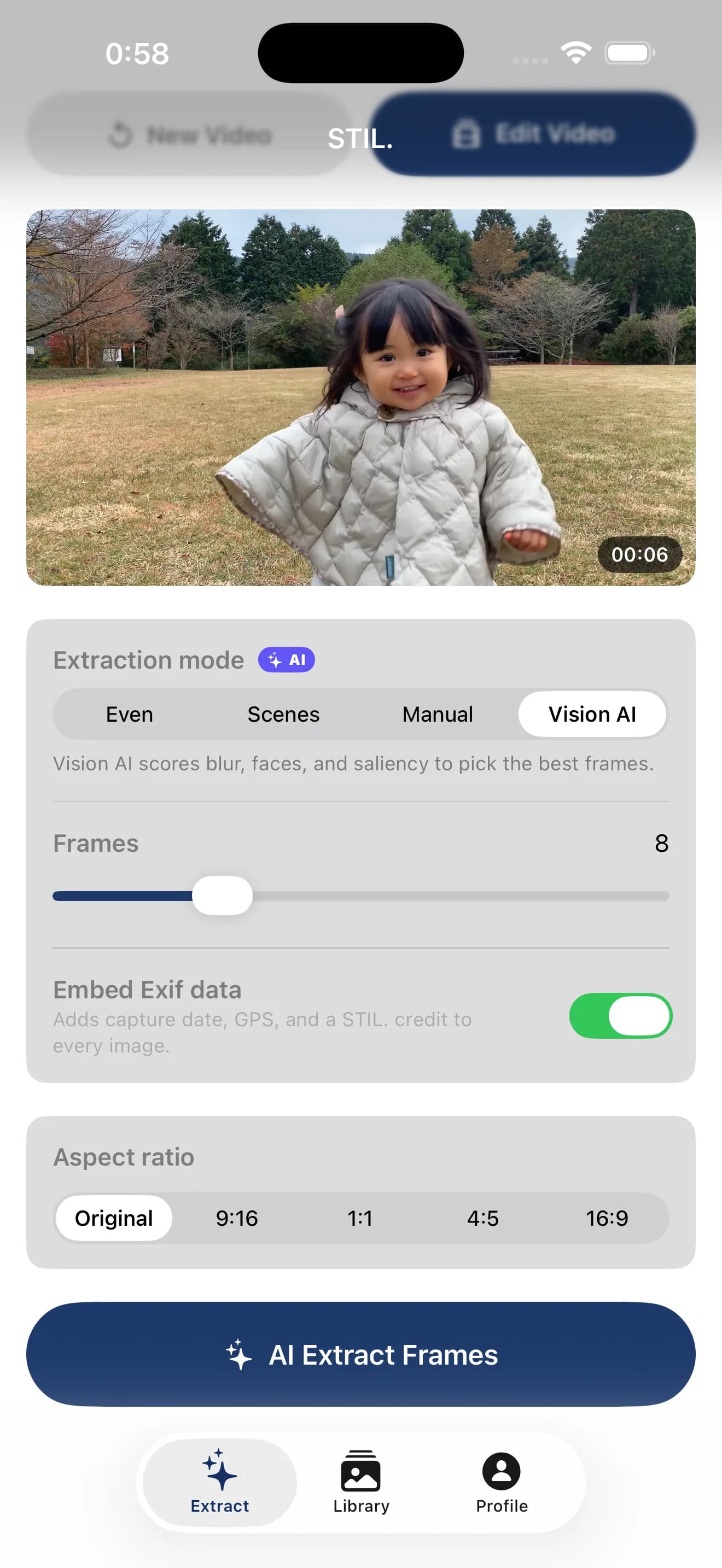
Vision AI

Apple Vision evaluates face capture quality, sharpness, and attention saliency to surface the single frame that stands as a photograph.

01

Uniform

Split the video into even intervals and export exactly the count you ask for.

02

Scene

Detect scene changes automatically and keep only the meaningful transitions.

03

Manual

Step through the preview frame by frame and pick exactly the ones you want.

Inside the Vision AI score

VisionFrameScorer.swift

  • 01Laplacian variance for blur detection
  • 02VNDetectFaceCaptureQuality — Apple's photo-grade face quality
  • 03VNGenerateAttentionBasedSaliency — attention map
  • 04Composite: Sharpness 60% / Face Quality 30% / Saliency 10%
003Privacy

On-device Privacy

Nothing leaves your device.

Your videos and extracted frames stay on your device. No cloud upload, no server processing. Even the web version runs entirely inside your browser.

004Native

iPhone Native

Designed for the Apple Neural Engine.

Not a generic cross-platform port. STIL. is built for iPhone, made to draw the full performance of the Apple Neural Engine and the Vision framework.

Apple Neural Engine

Technical

spec.txt
  • 01Apple Neural Engine optimized
  • 02Core ML 2× upscaling (PiperSR)
  • 03Vision Framework: face quality, saliency, scene classification
  • 04AVFoundation + Core Image, GPU-accelerated
  • 05StoreKit 2 / iCloud (CloudKit) sync
  • 06iOS 26.4+ · iPhone 12 or later recommended
005Intelligence

On-device Intelligence

Eleven AI tools, all on Apple Silicon.

From picking the best frame to polishing every shot — four AI tools for video, seven for photo. All on-device, offline-capable.

Source
Auto Grade
Source
Skin · Face Light

Video AI

04
  1. 01

    Vision AI extraction

    Detects blur, faces, and saliency to pick the best frames automatically.

  2. 02

    Auto Color Grade

    Vision classifies the scene — sunset, night, outdoor, indoor — and applies a matching color preset to the entire clip.

  3. 03

    Smart Trim

    Scores frames at 1fps (sharpness + face + brightness) and isolates the most watchable segment.

  4. 04

    Face Focus

    Measures average face brightness across the clip and balances skin exposure automatically.

Photo AI

07
  1. 01

    AI Super Resolution

    2× upscaling on the Apple Neural Engine. Edges and detail preserved.

  2. 02

    Background Blur

    Vision detects the subject and renders a lens-style background blur.

  3. 03

    Scene Grading

    Identifies the scene and grades the color automatically.

  4. 04

    Subject Color

    Keeps the subject in color. Sends the background to monochrome.

  5. 05

    Skin Smoothing

    Smooths skin only. Eyes, lips, and brows stay sharp.

  6. 06

    Face Brightness

    Detects faces and balances skin brightness.

  7. 07

    Horizon Correction

    Detects the horizon line and straightens the frame.

006Pricing

Three simple plans.

Monthly
¥500
/ month

Start light.

Yearly
¥3,000
/ year
Recommended

¥250 / month. Save 50%.

Lifetime
¥4,000
one-time
Regular ¥6,000
Early access · First 100 only

Pay once. Use forever.

Billing is via the App Store only. Pricing may change without notice.

007Compare

Plan Comparison

Find the plan that fits.

Billing is via the App Store only. Sign-up is free.

Guest

No sign-up. Start now.

$0no sign-up
  • Extraction

    • Uniform / Scene / Manual modes
    • Vision AI extraction
  • AI tools

    • Three video AI tools
    • Photo AI preview (7 tools)
    • Photo AI apply
  • Library

    • Cloud-synced library
  • Export

    • 4K export (iOS)
    • HEIC export
    • Four Pro film stocks
  • Customization

    • WatermarkSTIL. shown
    • Custom preset save
    • Embed Exif (date / GPS)
Free account

Sign up to unlock more.

$0free forever
  • Extraction

    • Uniform / Scene / Manual modes
    • Vision AI extraction
  • AI tools

    • Three video AI tools
    • Photo AI preview (7 tools)
    • Photo AI apply5 / month
  • Library

    • Cloud-synced library
  • Export

    • 4K export (iOS)
    • HEIC export
    • Four Pro film stocks
  • Customization

    • WatermarkRemovable
    • Custom preset save1 preset only
    • Embed Exif (date / GPS)
Recommended
Pro

Everything, without limits.

¥500/ month →
iOS app coming soon
  • Extraction

    • Uniform / Scene / Manual modes
    • Vision AI extraction
  • AI tools

    • Three video AI tools
    • Photo AI preview (7 tools)
    • Photo AI applyUnlimited
  • Library

    • Cloud-synced library
  • Export

    • 4K export (iOS)
    • HEIC export
    • Four Pro film stocks
  • Customization

    • WatermarkCustom logo
    • Custom preset saveUnlimited
    • Embed Exif (date / GPS)
008Early Access
Lifetime
100limited

Early access — first 100 only.

Get the lifetime version at ¥4,000. After 100 sign-ups, the price returns to ¥6,000.

009Release

Finish your photos on iPhone.

The iOS app is on the way. Try a slice of it in your browser today.

STIL. — All of it, inside this iPhone.